How To Do Whoosh Effect At Beginning Of Clip CapCut for Reels
How To Do Whoosh Effect At Beginning Of Clip CapCut for Reels is one of the easiest ways to make your short videos look smooth and professional. When a Reel starts with a soft whoosh sound, it feels clean and exciting. Frankly speaking, this little sound may alter the entire atmosphere of your video.
Most of the creators concentrate on the visuals, however, sound is important as well. A whoosh effect helps the viewer feel movement from the first second. Well, that is why most viral Reels use it. CapCut makes this process simple, even if you are new to editing.
If you want your Reels to feel modern and eye-catching, learning this effect is a must. You know, once you master it, your videos will feel more polished without extra effort.
What Is a Whoosh Effect and Why It Matters for Reels
A whoosh effect is a fast sound that feels like air moving. It is often used when a clip starts, ends, or changes scenes. This sound tells the viewer that something new is coming. It keeps attention strong.
For Reels, the first two seconds are very important. A whoosh effect adds energy at the start. It helps your video feel smooth instead of sudden. Many editors use it to guide the viewer’s ears and eyes together.
How To Do Whoosh Effect At Beginning Of Clip CapCut for Reels
To apply this effect, you do not need advanced skills. CapCut already gives useful tools. You just need to know where to tap and how to adjust timing. It is a good method to use on both CapCut on Android and CapCut on iOS.
Be sure that you have a clip beforehand. Trim the start properly. A clean clip makes the whoosh sound more natural. Now let’s move step by step.
How To Do Whoosh Effect At Beginning Of Clip CapCut for Reels Step by Step
Firstly, open CapCut and create a project. insert your video clip to the time line. Make sure the clip starts exactly where you want the motion to begin.
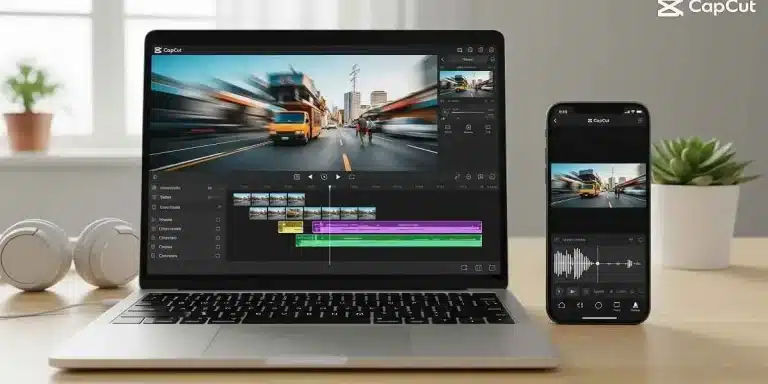
Next, tap on “Audio” and then “Sound effects.” Search for whoosh. Pick a soft and clean sound. Drag it at the start of the clip. Vary volume not too loud. Preview once. Honestly, that’s it.
Using External Whoosh Sounds for Better Control
Sometimes built-in sounds feel limited. You can download a whoosh sound from a safe source. Import it into CapCut as audio. Place it at the start of your clip.
This method gives more control. You can choose soft, deep, or fast whoosh sounds. In my experience, softer sounds work better for lifestyle Reels. Just keep timing tight and clean.
Tips to Make Whoosh Effect Sound Professional
Timing is everything. The whoosh should start just before the visual movement. This makes the sound feel connected to the clip. If it starts late, it feels off.
Keep volume balanced with background music. Do not let the whoosh overpower voices. Use fade-in if needed. Always listen through headphones. Minor transformations count a lot.
Common Mistakes Beginners Should Avoid
The most common error is excessive use of the effects of whoosh. Overuse can annoy viewers. Use it only when it adds value.
Another issue is poor placement. If the sound starts after the clip begins, it feels wrong. Also, many people forget to preview before export. Always check once before saving CapCut for iOS.
Best CapCut Versions for Smooth Whoosh Effects
CapCut Pro offers more sound effects and better control. Many users like CapCut Pro APK for unlocked features, but safety matters. Be careful with CapCut Mod APK because it can cause issues.
Some people still use CapCut Old Version on low devices. It works, but sound options are limited. For best results, CapCut Pro APK Download Latest Version gives smoother editing and better sound quality.
Using CapCut on Different Devices
Editing Reels is not limited to phones now. CapCut for PC is useful for large screens and better control. You can see audio waves clearly and adjust timing easily.
CapCut for Mac also works smoothly and feels stable. If you edit long content, desktop versions save time. Mobile is still best for quick Reels, though.
Conclusion
Using a whoosh effect at the beginning of a clip can instantly improve your Reel quality. It adds motion, emotion, and flow without extra visuals. This small sound creates a strong first impression.
CapCut makes this process easy for beginners and creators alike. You do not need professional skills. Just basic timing and good sound choice are enough.
Practice different whoosh sounds and styles. Over time, you will feel what works best for your content. Keep things simple and clean.
Now it’s your turn. Try adding a whoosh today and see how your Reels feel more alive. Use How To Do Whoosh Effect At Beginning Of Clip CapCut for Reels naturally and enjoy the results.
FAQs
What is the whoosh effect used for in CapCut Reels?
It is used to add smooth movement and energy at the start of a clip, helping grab attention quickly.
Can beginners add whoosh effect easily in CapCut?
Yes, CapCut‘ contains an in-built sound effect which a novice can add with a few taps.
Does CapCut Pro give better sound effects?
CapCut Pro offers more sound options and better control, which helps create cleaner edits.
Can I use whoosh effects on CapCut for PC?
Yes, CapCut for PC supports sound effects and allows precise audio timing.
Is external whoosh audio better than built-in effects?
External sounds give more choice, but built-in effects are enough for most Reels.
Why does my whoosh sound not sync properly?
This usually happens due to late placement or trimming issues. Adjust timing carefully.